To delete a Discord server, you must be its owner. An Administrator role is not enough. Deletion is immediate and permanent: Discord cannot restore the server, its members, or its messages.
| Platform | Path to Delete Server |
|---|---|
| Desktop or browser | Server name (or right-click) → Server Settings → scroll to Delete Server |
| iPhone or Android | Server name or ⋯ → Settings → Overview → Delete Server |
- Open the Discord server you own on desktop or in a browser.
- Click the server name at the top left, then select Server Settings.
- Scroll down the left settings menu and select Delete Server.
- If your account has two-factor authentication (2FA), enter your 2FA code. If it does not, type the server name exactly as shown.
- Select Delete Server to permanently remove it.
Before you delete a Discord server
Treat deletion as final. Discord Support says that deleted servers cannot be restored, including their members and messages. There is no recycle bin, 30-day grace period, or Support recovery process for the server’s content.
Checklist before you confirm:
- Save anything you still need: announcements, rules text, artwork, or contact details.
- Tell moderators and members if the server is active. They lose access as soon as you confirm.
- Confirm you are signed in as the owner (crown on the Members list), not only an admin.
- Decide whether delete, leave, transfer, or a read-only freeze is the right move.
| You want | Do this instead of deleting |
|---|---|
| Stop participating in someone else’s server | Leave Server |
| The community should continue without you | Transfer ownership, then leave |
| Remove one channel, role, or a few messages | Delete those items only |
| Keep history but stop chat | Lock channels as a read-only archive |
Official instructions: How do I delete a server?.
How to delete a Discord server on desktop or browser
These steps work in the Discord desktop app and in a supported web browser.
| Step | Where |
|---|---|
| Open settings | Click the server name at the top of the channel list, or right-click the server. Choose Server Settings. |
| Find Delete Server | Left sidebar, at the very bottom, in red. Scroll past Enable Community and Server Template. |
| Confirm | 2FA code if 2FA is on; otherwise type the exact server name. |
- Sign in to the Discord account that owns the server.
- Select the server from the server list on the far left.
- Click the server name at the top of the channel list. Discord labels this control with the server name, for example Weekend Games. You can also right-click the server.
- In the menu that opens, select Server Settings. It sits near the top of the list, under Invite to Server.
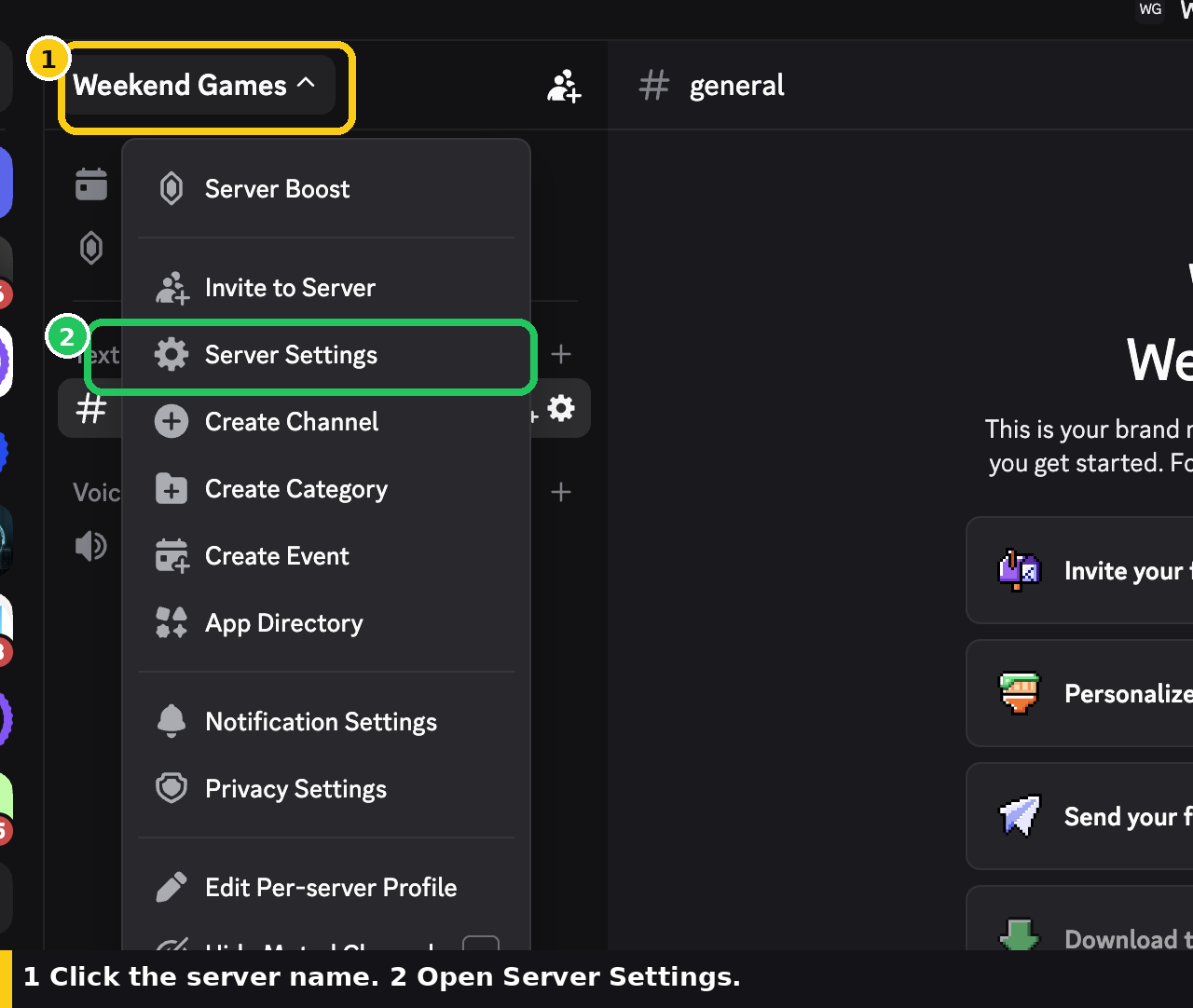
Click the server name at the top left, then choose Server Settings.
- In Server Settings, look at the left-hand list. Scroll to the very bottom, past Enable Community and Server Template, and select the red Delete Server option.
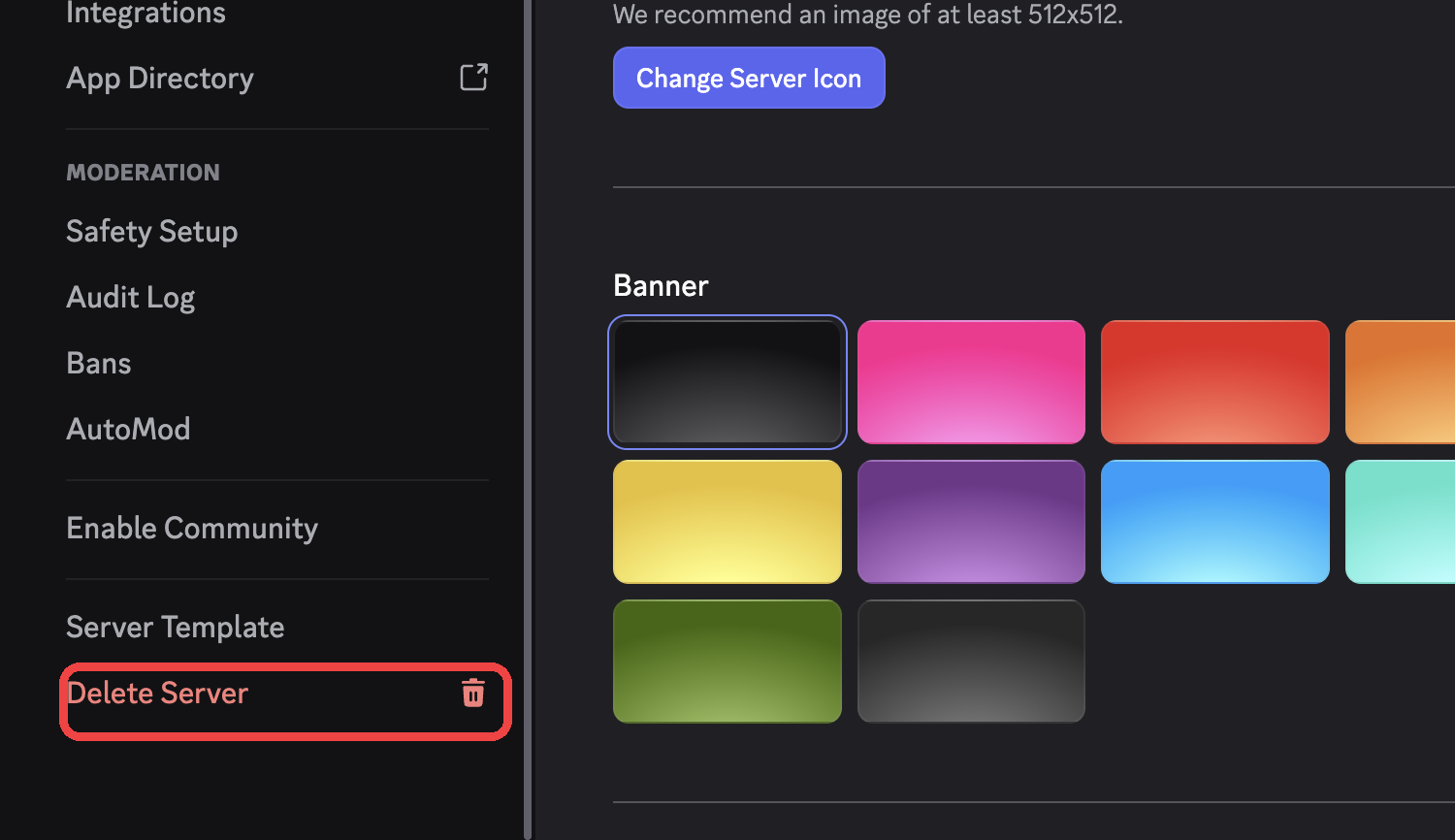
Scroll the Server Settings sidebar to the bottom and click Delete Server.
- Complete Discord’s confirmation prompt. If 2FA is enabled on the owner account, enter the requested 2FA code. If 2FA is not enabled, type the server’s exact name. For a server named
Weekend Games, you must typeWeekend Gameswith the same spelling and spacing. - Select Delete Server. This is the point of no return. Use Cancel if you are not ready.
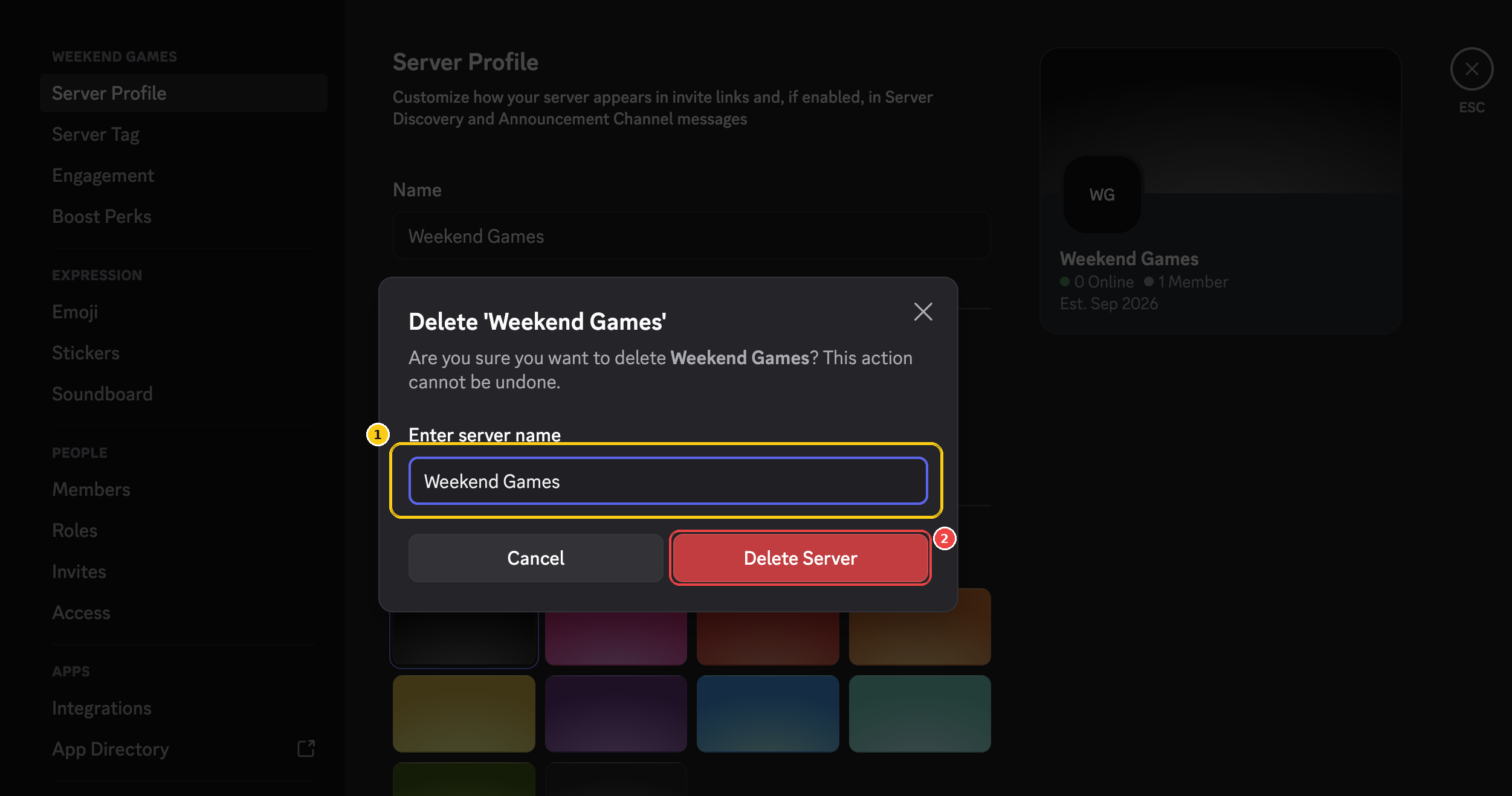
Type the server name exactly, then confirm. Cancel if you are not ready.
| 2FA on the owner account? | Discord asks for |
|---|---|
| Yes | Authenticator code |
| No | The exact server name, including spelling and spacing |
Check the spelling before you confirm. Discord will not offer an undo, a recycle bin, or a Support restore.
How to delete a Discord server on iPhone or Android
The ownership rule and the permanent result are the same on iPhone and Android. The labels can differ by app version: some builds use a ⋯ menu next to the server name; newer builds use the server-name chevron, then a Settings gear.
- Open the Discord app and select the server you own from the server list.
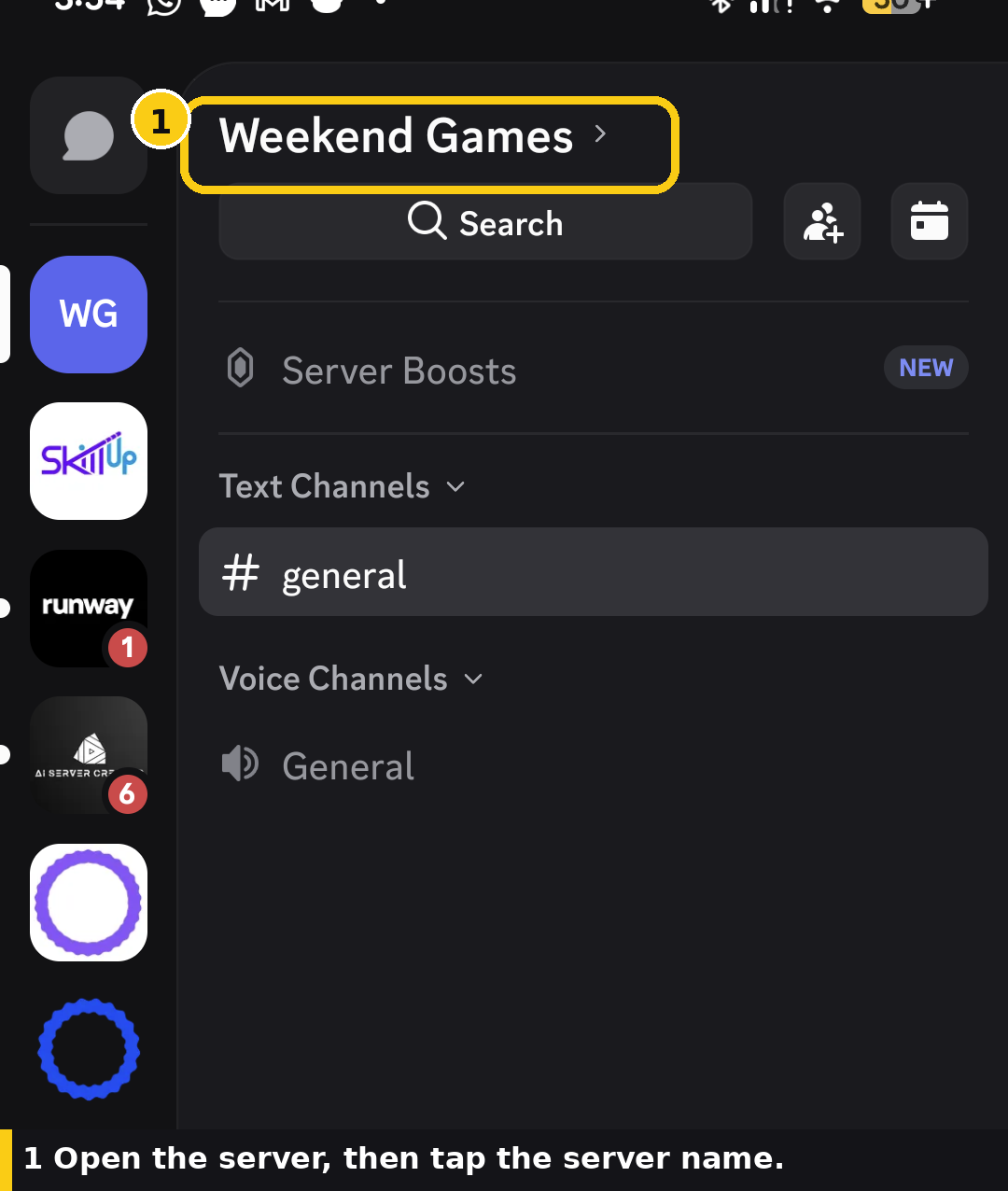
Open the server, then tap the server name at the top.
- Tap the server name at the top of the channel list (it shows a chevron, for example Weekend Games >). If you see ⋯ next to the name instead, tap that.
- On the server sheet, tap the gear icon labeled Settings (or tap Settings in the ⋯ menu).
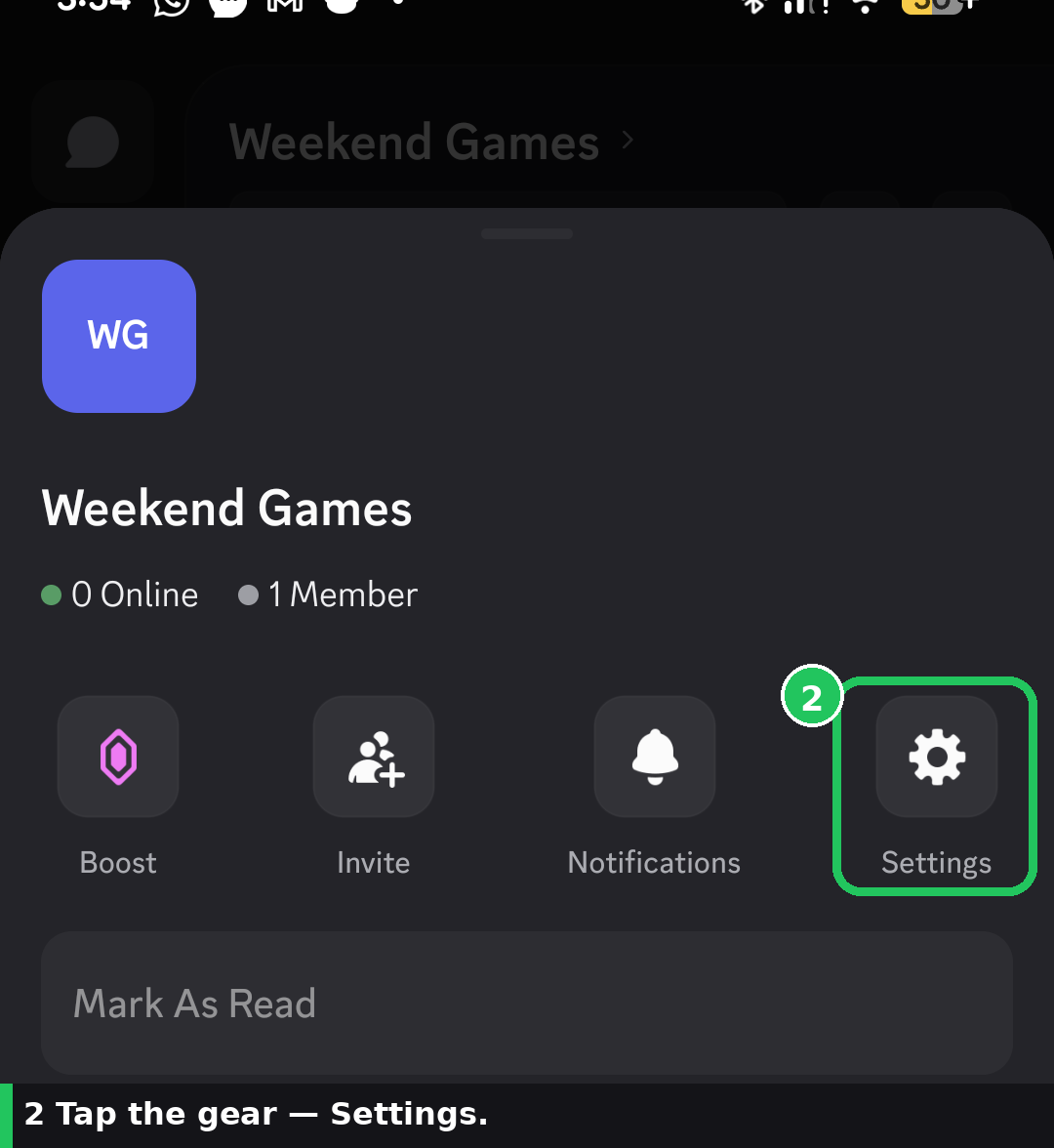
Tap the gear icon to open Settings.
- Tap Overview.
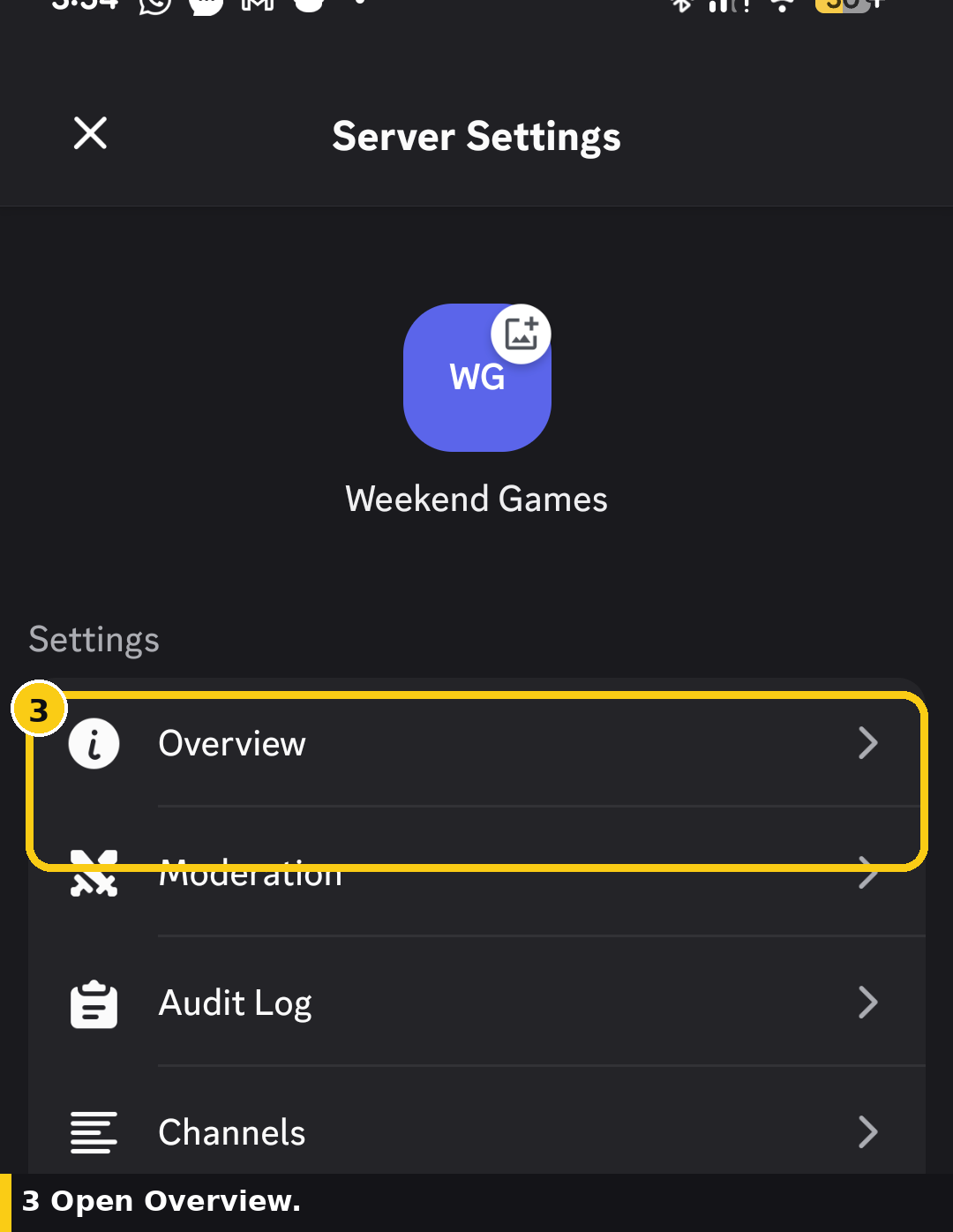
Open Overview from Server Settings.
- Swipe down until you find Delete Server at the bottom of Overview, then tap it.
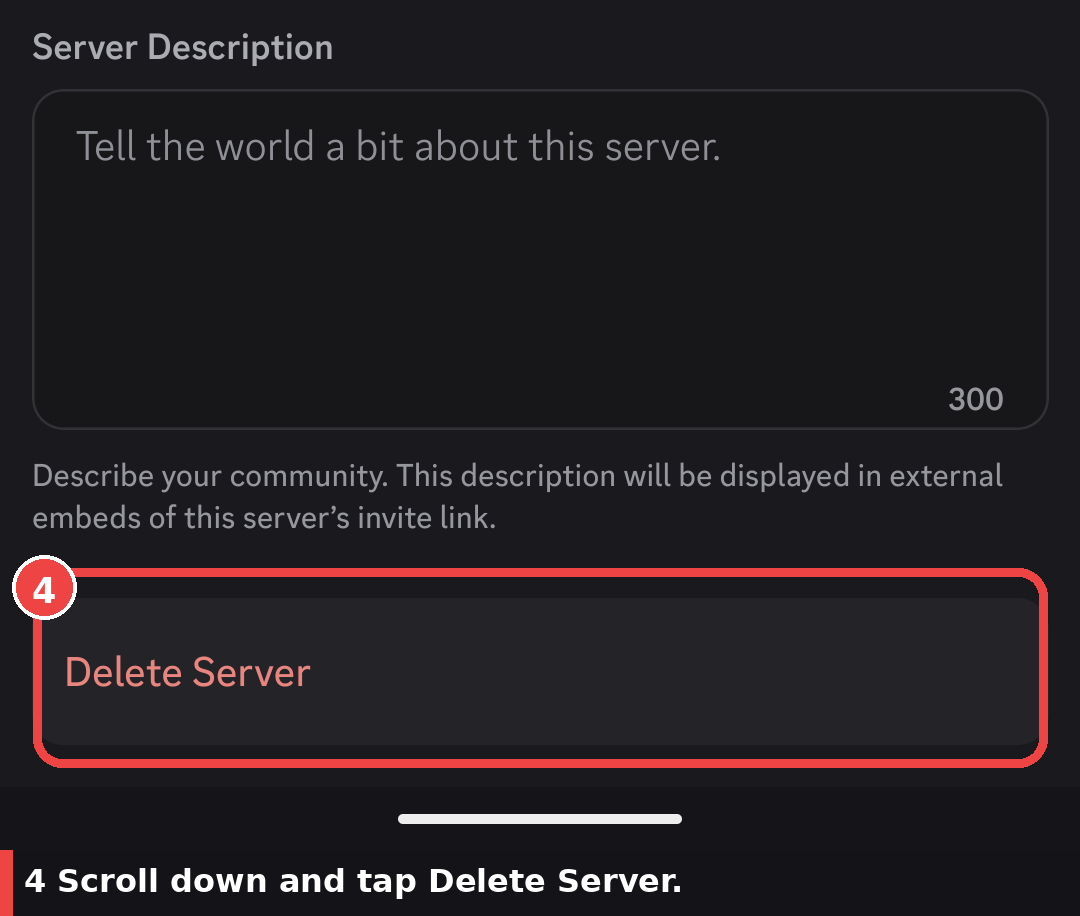
Scroll to the bottom of Overview and tap Delete Server.
- Complete the confirmation. With 2FA enabled, enter your 2FA code. Without 2FA, Discord asks Yes or No. Yes deletes the server for everyone. Tap No if you are not sure.
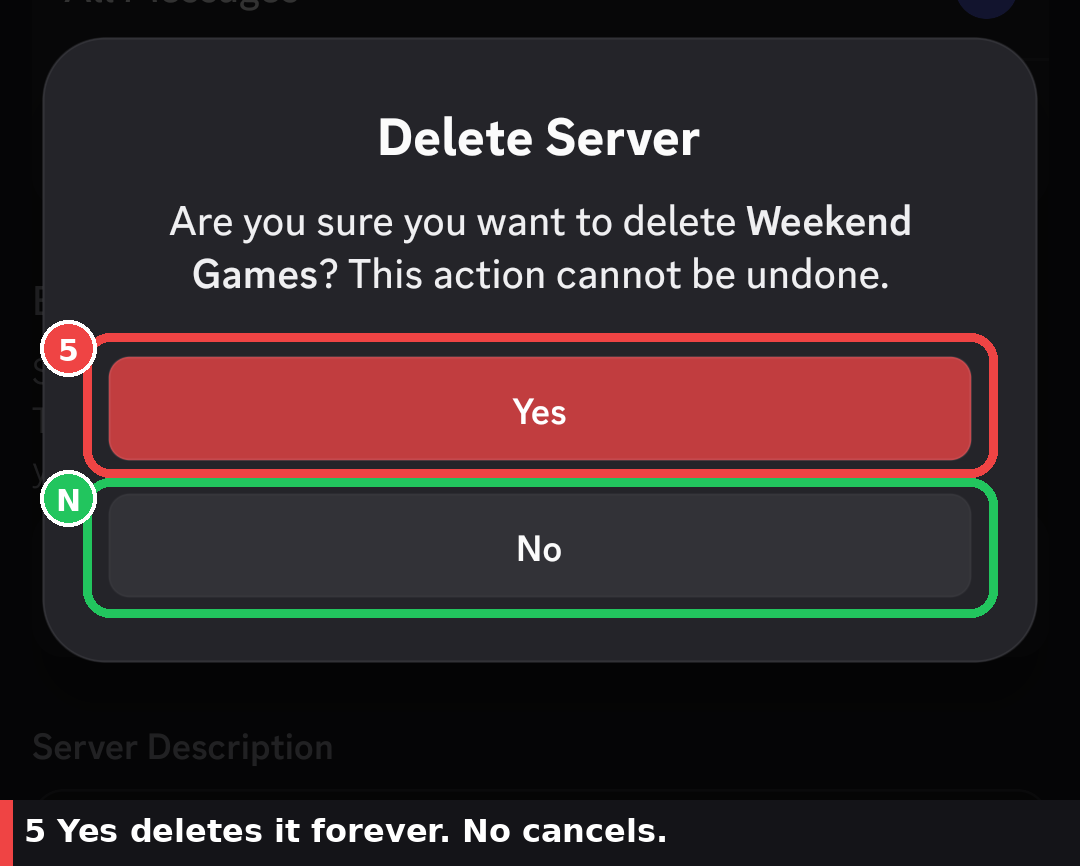
Yes deletes the server permanently. No cancels.
| 2FA on the owner account? | Mobile confirmation |
|---|---|
| Yes | Authenticator code |
| No | Yes deletes for everyone; No cancels |
Do not confuse this with leaving a server. A server owner using Delete Server removes the server for everyone, not just from their own server list.
If you cannot see Delete Server
Only the current owner can delete a server. Admin permission does not change that.
How to check that you are the owner:
- Open Server Settings.
- Open Members.
- Look for the crown icon next to a name. That person is the owner.
| You see | Likely cause | What to do |
|---|---|---|
| No Delete Server option | You are not the owner | Ask the owner, or get ownership transferred to you |
| You expected to own it, still no button | Server requires 2FA for moderator actions; your account does not have 2FA | Enable 2FA, then return to Overview or Server Settings |
| You are the owner and 2FA is on | Wrong server, or you have not scrolled to the bottom | Open that server’s settings and scroll past Community and Templates |
| Mobile Overview looks empty at the bottom | App version uses ⋯ instead of the name chevron | Try ⋯ → Settings → Overview, and keep scrolling |
Enable 2FA on the owner account:
- Open User Settings.
- Open My Account.
- Under Password and Authentication, set up an authenticator app or a security key.
- Return to the server and look for Delete Server again.
Discord’s setup guide: Setting up Multi-Factor Authentication.
Delete vs leave vs transfer ownership
These actions are not interchangeable.
| Action | Who can do it | What happens | Use when |
|---|---|---|---|
| Delete Server | Server owner only | Permanently removes the server and its Discord-hosted content for everyone | You want the server gone |
| Leave Server | Any non-owner member | Removes only your access. The server continues | You are not the owner, or you already transferred |
| Transfer ownership | Current server owner | Another member becomes owner. You stay as a member | The community should keep running without you |
Transfer ownership on desktop
- Open Server Settings → Members.
- Find the member, hover, and click the three dots.
- Select Transfer Ownership.
- Acknowledge the warning, enter a 2FA code if asked, and confirm.
You remain in the server. Your remaining access depends on the roles you still have. After the transfer, only the new owner can delete the server. Official steps: How to Transfer Ownership of a Discord Server.
Transfer ownership on mobile
- Open Settings → Members.
- Tap the member who should become owner.
- Select Transfer Ownership.
- Acknowledge the warning and confirm. Enter a 2FA code if asked.
Leave a server you do not own
- Right-click the server icon on desktop, or long-press it on mobile.
- Select Leave Server.
- Confirm.
If you still own the server, transfer ownership first. Discord will not let an owner leave while they are still the owner.
What is gone vs what stays
Deleting the server removes Discord-hosted server content. It does not wipe your Discord account or people’s DMs.
| Gone from Discord | Still exists |
|---|---|
| Channels, categories, and their messages | Direct messages between people |
| Member list, roles, and permission overrides | Friend relationships |
| Server emoji and stickers | A data export you already requested from Discord |
| Audit log | Bot data stored only on the bot’s own servers (that still does not restore the Discord server) |
| Server-side bot configuration | Nitro on your account |
| Invite links (they stop working immediately) | — |
| Boosts applied to this server | Boosts can be used elsewhere later; deletion can still break a boost streak. See Server Boosting FAQ |
Discord Support does not restore any of the “gone” items after deletion.
Alternatives to deleting
| Alternative | What you do | Result |
|---|---|---|
| Transfer ownership | Members → Transfer Ownership | Community keeps running under a new owner |
| Leave | Leave Server after you no longer own it | You are out; the server stays |
| Read-only archive | At the category level, keep View Channel for @everyone and turn off Send Messages. Pin a shutdown note | History stays; chat stops |
| Delete | Delete Server | Discord-hosted server content is gone for everyone |
A read-only archive is a permission change, not a Discord “archive server” button. Do not confuse it with archiving a single channel.
If the owner is inactive
You cannot delete a server you do not own, even if the owner has vanished. Discord Support may transfer ownership only when all of these are true:
- The server has 100 or more members (active user count).
- The current owner has not accessed their account for at least a month.
- You have been active on your account in the last 30 days.
- You have administrator or moderator permissions in that server.
- The server is not monetized.
Include this in the request:
- Server name and server ID
- Inactive owner’s username and user ID
- Your username and user ID
Full criteria: Requesting a Transfer of Server Ownership. If those rules are not met, Support will not transfer the server.
Related Discord tools
Before you delete, you can copy rules or permission layouts you still want to reuse:
Discorder.tools is not affiliated with Discord Inc.
Frequently asked questions
Can I undo an accidental Discord server deletion?
No. Deletion is immediate and permanent. Discord has no recycle bin or grace period, and Discord Support cannot restore the server or its content.
Why is the Delete Server button missing?
| Check | What it means |
|---|---|
| No crown on your name in Members | You are not the owner. Admin is not enough |
| Server requires 2FA for mod actions | Enable 2FA on the owner account |
| You have not scrolled far enough | Delete Server is at the bottom of Server Settings (desktop) or Overview (mobile) |
Can Discord recover my members or messages after I delete the server?
No. Discord Support states that deleted servers cannot be restored, including members and messages. Roles, channels, emoji, stickers, and audit-log data are also not recoverable through Discord after deletion.
Do members get notified when I delete a Discord server?
No.
- Discord does not send a “server deleted” message, email, or push.
- The server icon disappears from members’ server lists.
- Someone who was in a channel may just disconnect or see an error.
Tell people before you confirm if they still need to save anything.
Does leaving a server delete it?
No. Leaving removes only your membership. Server deletion is an owner-only action.
Can an administrator delete a Discord server?
| Role | Can delete the server? |
|---|---|
| Owner | Yes |
| Administrator or moderator | No |
| Other members | No. Use Leave Server |
Can I delete a Discord server I don’t own?
No. Ask the owner to delete it, or ask them to transfer ownership to you first.
What happens to DMs and friends after I delete the server?
Direct messages and friend relationships are user-level. They stay. Invite links for the deleted server stop working.
What happens to server boosts?
The server is gone, so boosts on that server are no longer applied there. Your Nitro subscription is separate. Discord lists server deletion as a reason a boost streak can end. Details: Server Boosting FAQ.
Can I delete my Discord account if I still own a server?
Not until you transfer ownership or delete every server you own. Account deletion is a different flow from server deletion.
How do I enable 2FA so Delete Server appears?
User Settings → My Account → Password and Authentication → set up an authenticator app or security key. Then reopen the server’s Overview or Server Settings. Guide: Setting up Multi-Factor Authentication.

With a background in AI and a passion for clear technical communication, I enjoy breaking down complex tools and processes. Exploring new software and sharing insights is a key focus.
Run a gaming, tech, or AI site? Write for us or swap links →