Image: aiagentstore.ai
A little creativity can change the way you chat on Discord. Plain messages often make conversation feel dry. Creative ones get reactions, replies, and real engagement.
Discord is not just a messaging platform. It can be considered a place where friendships form, communities grow, and conversations happen almost all the time.
However, lively conversation demands a little effort. The old greeting style and repetitive chats can make conversations boring. The good news is that there are simple ways you can use to make your Discord chats vibrant and surprising. Let's discuss them in this blog.
Tips and Tricks to Make Your Discord Chats More Interesting
Ask Intriguing Questions
Many of you are still using generic questions. Such questions rarely make a conversation exciting. So it's better to ask questions that seem unusually interesting. This gives people time to think, reflect, and respond well.
For instance, you can ask your friend, "If our server had a mascot, what would it be?"
Such a question can interest other members and generate enthusiastic responses.
You can also create a daily question for your server. However, it is important to keep the question relevant to the group. A gaming community might discuss the strange game events they encountered, whereas a study group may discuss their exam moments. So keep your questions aligned with the group and its interests.
Use Memes and GIFs at the Right Moment
Text cannot always depict the mood of a conversation. This is where GIFs and memes come in. They can add humor, emotion, and context in a single tap.
However, timing plays an important role here. A well-timed GIF after a joke can make the conversation even funnier. A meme at the right time, when conversation lags, can get it going again.
But too many GIFs and memes can take away the charm. Memes are like seasoning. They should be used to add flavor rather than being the entire meal.
Discord has a built-in GIF selector that makes it easier to find the perfect reaction. You can browse the trending animations or search for a relevant GIF by typing specific keywords into the search bar.
Sending a delayed GIF when the topic has already passed can disrupt the flow of the chat. You should select them according to the context and pace of the chat.
Create Quick Games for Your Server
Games are a great way to keep the users engaged even when there is little to say. They can also work in active communities where people have different interests.
The following are some games you can use in your server.
- Two Truths and a Lie - Everyone tells three things about themselves. Other members have to decide which one is not true.
- Guess the Character - Describe a character without telling their name.
- Would You Rather - Give two funny or tricky choices.
- One-Word Story - Every person says one word to create a weird story.
These are some games that don't even require a technical setup and can provide an easy way for members to interact. However, keep the rules easy so that more people can enjoy the game. You can even create a separate channel for games so that other conversations remain organized.
Send Creative Messages
You can turn your simple text into a surprising one by using formatting options that many people never even touch. They can make your message stand out instantly.
Discord supports Markdown formatting, through which you can make your text stylish, emphasize words, hide spoilers, and organize longer messages. The following are some of the examples you can use.
Bold text: **This is important!**

Bold text in Discord
Italic text: *Wait, what?*

Italic text in Discord
Strikethrough: ~~I totally meant to do that~~

Strikethrough text in Discord
Spoiler text: ||Don't read this yet!||

Spoiler text before it is clicked
Once the user clicks on it, the message will be revealed.

Spoiler text after it is clicked
Code formatting: `secret mission`

Code formatting in Discord
You can use these formatting options for fun texts, dramatic reveals, or playful reactions.
For example, you can write I ~~always~~ never win at this game. The strikethrough creates a small twist. It changes the meaning of the sentence and adds a touch of humor without needing a long explanation.
Another way to surprise your friends is by sending a blank message. Your friend may click on the message and wonder what went wrong with Discord.
You might be wondering how to get invisible characters, as Discord doesn't allow sending blank messages. Well, it's possible through an invisible character generator tool that allows users to copy invisible characters. Many of them are available for free, such as the one by Prepostseo.
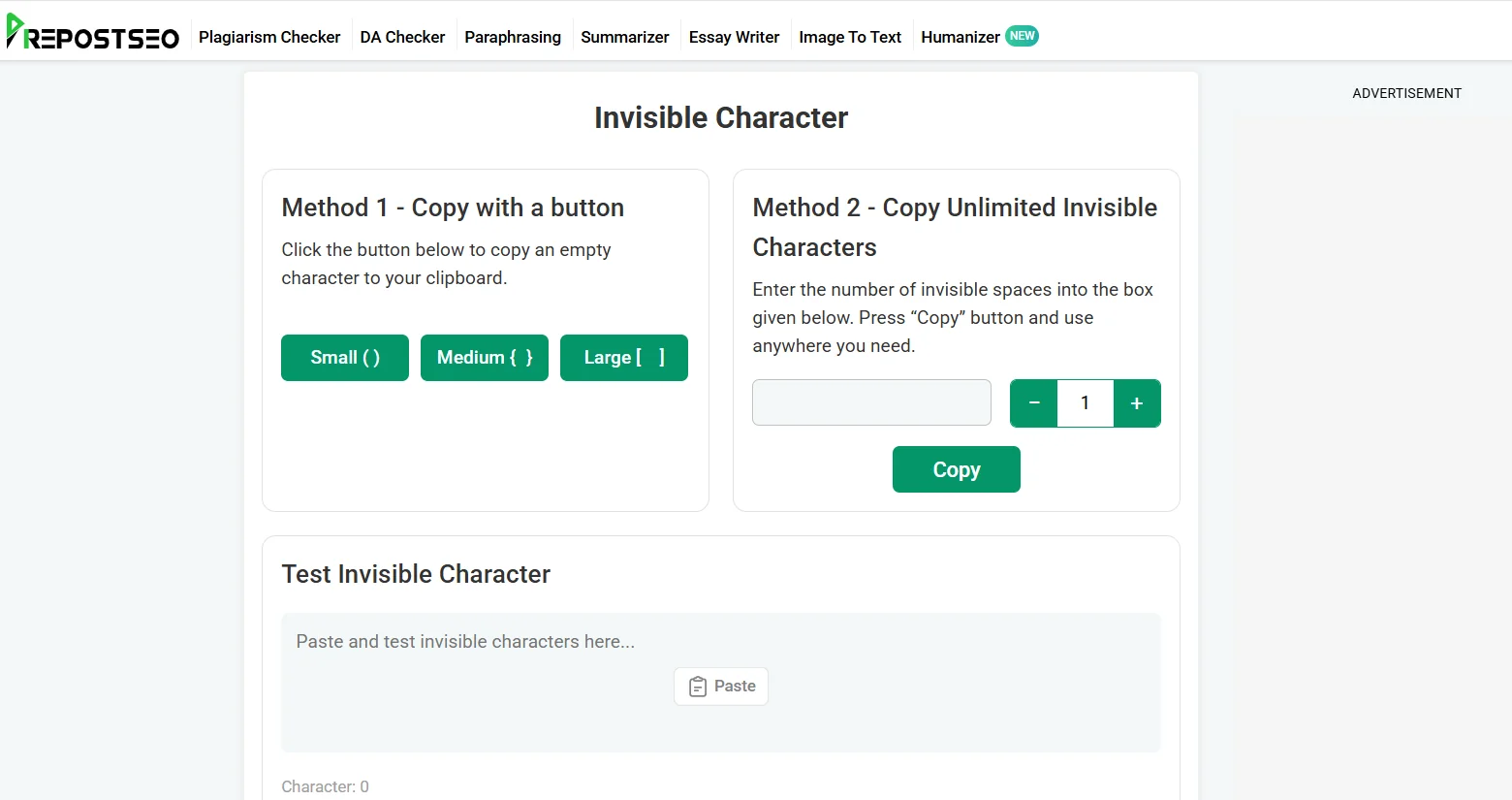
Prepostseo Invisible Character tool
Tool Link - https://www.prepostseo.com/invisible-character
This tool allows you to copy small, medium, or large invisible spaces. You can also copy any specific number of spaces as well, depending on your needs.
However, you should always use such a tool to surprise your friends, not to annoy them by spamming invisible characters again and again.
Use Polls to Get Everyone Involved
You can create interesting and interactive polls on Discord to involve everyone. Polls give users an easy way to join in. You don't need to ask everyone. You can add a poll and let the users choose an option.
Discord allows you to create an interactive native poll feature. You can add up to ten answer options that users can vote on with a single click.
The following are some examples of interesting polls you can create on Discord.
- Which game should we play today?
- What's the best late-night snack?
- Who would survive longest in a zombie apocalypse?
- Should our next server event be a quiz or a tournament?
Such polls are easy to answer and give something to discuss after voting. Someone may defend their choice, and others may challenge it. This keeps the chat going and creates interest in the conversation.
Final Thoughts
Plain messages can seem dry and may not keep the Discord conversation going for long. Fortunately, there are simple ways you can try to make your chat interesting and surprising.
You can ask questions to let the other person ponder and then share their thoughts. Memes also work well to keep the chat interesting. Share relevant memes and GIFs at the right time for light humor.
You can send creatively formatted text or invisible spaces to surprise your friends. Creating polls also helps users share their thoughts on different options and lets the conversation keep going. These are some useful ways to make chats captivating. Try these and see how they help keep your Discord chats interesting.

With a background in AI and a passion for clear technical communication, I enjoy breaking down complex tools and processes. Exploring new software and sharing insights is a key focus.
Run a gaming, tech, or AI site? Write for us or swap links →
Further Reading
How to Send Blank or Invisible Text on Discord (Step by Step)
Send a blank or invisible message on Discord with a zero width space: where to copy it, how to paste and send it, and what to do when it won't send.